Your data stays yours. The token and Query ID are stored on your computer, encrypted by your operating system. When you sync, your machine talks directly to IBKR over HTTPS — nothing passes through Helmfolio's servers.
Part A · Create an Activity Flex Query
This defines what data Helmfolio downloads and produces your Query ID.
-
1
Log in to IBKR Client Portal
Sign in at interactivebrokers.com on a desktop browser and open Client Portal.
-
2
Open Flex Queries
Go to Settings (the gear, top-right) and find Flex Queries under the Reporting section. Some accounts show it as Performance & Reports → Flex Queries.
-
3
Create a new Activity Flex Query
Next to Activity Flex Query, click the + (Create) button. Give it a name like Helmfolio.
-
4
Add the sections — click Select All in each one
Add each of the five sections below. When you open a section, click Select All so every field is ticked — this is the safest way to make sure no field Helmfolio needs is missed.
- ✓ Trades — your executions & orders (P/L, commissions, prices)
- ✓ Open Positions — current holdings & unrealized P/L
- ✓ Cash Transactions — dividends, interest, fees, deposits/withdrawals
- ✓ Net Asset Value (NAV) — for the equity curve
- ✓ Change in NAV — deposits & withdrawals
Why “Select All” matters: it guarantees the
FXRateToBasefield is included in the Cash Transactions section, which Helmfolio uses to convert non-USD dividends, interest and deposits into your base currency. Without it, foreign-currency amounts can be off. -
5
Set Format, Period & General Configuration
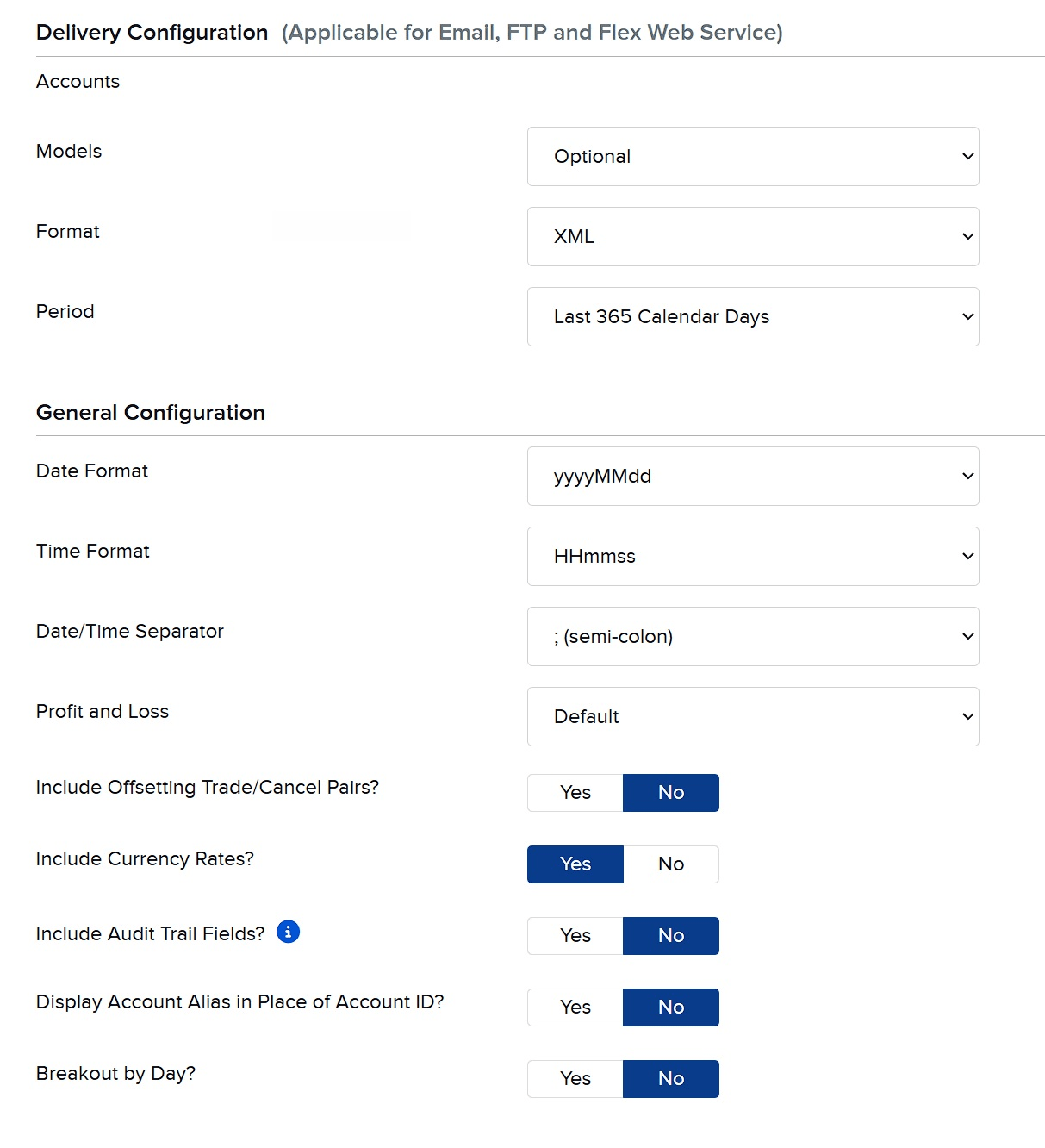
The IBKR “Delivery” & “General Configuration” panels — match every value to the tables below. First the basics:
- • Format: XML
- • Period: Last 365 Calendar Days (IBKR's maximum window)
Then, in the General Configuration panel, set every option to match this table exactly:
Setting Choose Date Format must match yyyyMMdd Time Format must match HHmmss Date/Time Separator must match ; (semi-colon) Profit and Loss Default Include Offsetting Trade/Cancel Pairs? No Include Currency Rates? Yes Include Audit Trail Fields? No Display Account Alias in Place of Account ID? No Breakout by Day? No Get these three exactly right before you save. Helmfolio reads dates as
yyyyMMdd, times asHHmmss, separated by a semi-colon (;). If the Date Format, Time Format or separator differ, your trade dates, holding periods and trade cycles will display incorrectly in Helmfolio — even though the statement looks fine on IBKR's side. This is the most common setup mistake. -
6
Save and copy the Query ID
Click Continue / Save. IBKR lists your query with a numeric Query ID — copy it. You'll paste it into Helmfolio later.
About “Include Currency Rates?” Helmfolio converts
non-base-currency cash (dividends, withholding tax, deposits/withdrawals) using the per-row
FXRateToBase field that
“Select All” already includes — not the separate currency-rates table.
So this toggle is optional; we leave it Yes (it does no harm).
Part B · Turn on the Flex Web Service
This produces your Token — the key that lets Helmfolio request your query.
-
7
Find the Flex Web Service Configuration
On the same Flex Queries page, look for the Flex Web Service Configuration panel (usually near the top or bottom of the page).
-
8
Enable it
Click the configure/gear icon, set the status to Active, and save. You may be asked to confirm with two-factor authentication.
-
9
Generate & copy the Token
IBKR shows a long Current Token (a string of numbers). Copy it now — you may not be able to view it in full again later.
Good to know. A new token can take a few minutes to activate. The token is valid for about one year, after which you'll regenerate it here. Keep it private — anyone with the token and Query ID could download your statements.
Part C · Enter them in Helmfolio
-
10
Open Helmfolio settings
In Helmfolio, open Settings (the gear) and find the IBKR Flex Web Service section.
-
11
Paste the Token and Query ID
Paste both, then click Save. They're encrypted by your OS and never uploaded.
-
12
Sync
Click Sync IBKR Flex Now on the dashboard. Your trades, positions, NAV and cash flow in automatically — and every future sync merges new data without duplicates.
A note on IBKR rate limits. IBKR restricts Flex API requests to roughly once every few minutes per token. If you click Sync IBKR Flex Now several times in a short window, IBKR may return an empty or failed response — that's IBKR throttling the request, not a Helmfolio error. If it happens, simply wait about 15 minutes and try again.
Troubleshooting
"Token expired" or "invalid token"
Tokens expire about a year after creation. Go back to Flex Web Service Configuration, generate a fresh token, and paste the new one into Helmfolio's settings.
"No data" or empty sync
Open your Flex Query and confirm the sections (Trades, Open Positions, Cash Transactions, NAV, Change in NAV) are selected and the period covers dates with activity. Save the query, then sync again.
I can't find Flex Queries in the menu
IBKR's menus differ by account type and change over time. Use the portal search box for "Flex", or look under Settings → Account Settings → Reporting. If you're still stuck, IBKR client services can point you to it.